I have a user that would like to add the notes associated with an Item when they "Export to excel". Is that possible and where can you find what query the form is using to create the CSV file?
Allow me to suggest two more options if you use DataViews to send to Excel:
Option 1: Create a DataView with IDO: SLItems, tick Show External/Internal Notes
Option 2: Create a DataView with two IDOs: SLItems & SLReportNotesViews, link by: RowPointer=RefRowPointer
Hello,
You can add a derive in Items IDO to pull the notes and concatenate. In items form you can add the derive field and do the export to excel.
export to excel is built in function of mongoose so I think it cant be modified..
Regards,
Kaz
I think Option 2 creating a DaatView is going to be a good alternative. Thank you for that solution. Is there a way to alter this process slightly where the DataView is based on a value enter by the user?
Yes,
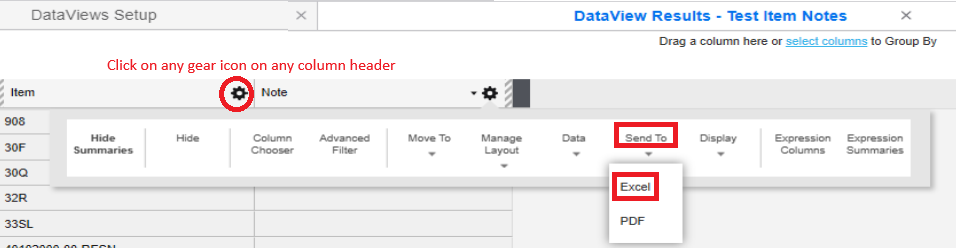
That worked. Thanks, I now have a DataView Result for one Item record with the associated Note. There appears to be only one piece of the puzzle that's missing. I can't export this to excel/csv. The button on the toolbar is not enabled when I am viewing a DataView Result.
Hi Steve,
Which "button on the toolbar" are you referring to?
Firstly, to ensure we are on the same frequency, my screenshots are based on the following User Preferences:
Secondly, if you are accessing SyteLine on web-client -
Else, if you are on an older version running Windows client on premise -
Lastly, when you deploy to end users: