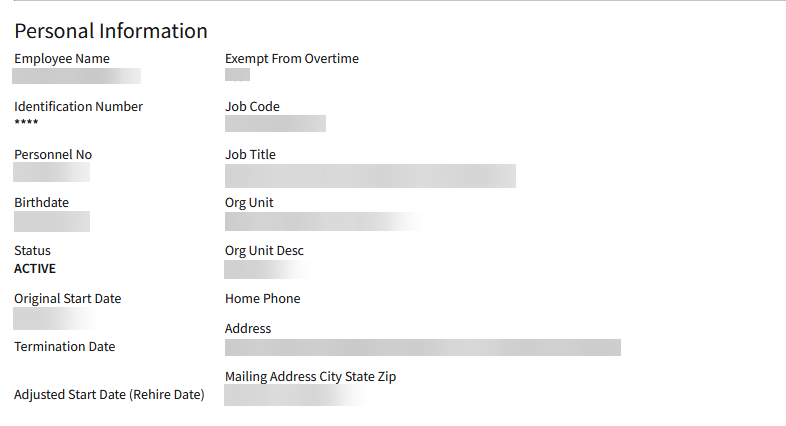
I've tried to clean up the form by trying to line up the columns but no luck. I've tried using paragraph and two/three columns nut no luck at all. This should be an easy fix and yet not working for me….any ideas please.
LPL code:
Form output:
instead of multiple instances of "two column", just try with one and list all the fields below it. it should result in something like the below
what do you mean when you say line up all the columns… vertically or horizontally? maybe "single column" is what you are looking for?
also, if you use "two column" or "three column", you need to specify which column you want to place the fields in by using "column(1|2|3|4|5|6|7|8|9|10)" like below two column column1 Employee column2 PresentationNameSnapshot
Answer - Vertically
When using "Two column", no need to specify column1 or column2 - at least that is what I'm used to. But will try your example
From the picture, I want "Employee name" to line up with "Org Unit Description" or vice-versa and subsequently the same for the rest.
Thanks
Formatting as opposed to line up
Aden, thank you. I found another approach, but your suggestion is cleaner
I know you said you found another approach, but I wanted to deposit this here for anyone looking for an answer in the future. I believe the answer to OP's request is to use the word "distributed" after you declare your column count for the layout.
If you intend to have a uniform look for two columns, you will state "two column distributed" and then list the fields indented underneath that declaration. Repeat as necessary.
What the "distributed" function does is divide up the page for that section into the number of columns you have stated. If you wanted to have variable field numbers but a uniform look, then I would recommend consistently listing the largest field count for each section using "distributed" and then placing the number of fields up to the max number underneath. This will keep them aligned even if there are less fields.
For example, if you want 2 fields on the top row, 3 fields in the middle row, and one on the bottom row, then you would use "three column distributed" for each section. That would look like this in LPL:
three column distributed FIELD FIELD
three column distributed FIELD FIELD FIELD
three column distributed FIELD
And that would display on the form like this:
Column1
Column2
Column3
FIELD
Mikel, Thank you for your input and the explanation regarding the distributed function.